Filter a collection with the query bar
Type a filter, projection, sort, skip and limit above a collection's documents, run it, and keep it as the collection's default query.
Every Collection Tab has a query bar above its documents. It is the quickest way to find documents: type a filter, press Enter, and the result appears below in the Table, Tree or JSON view.
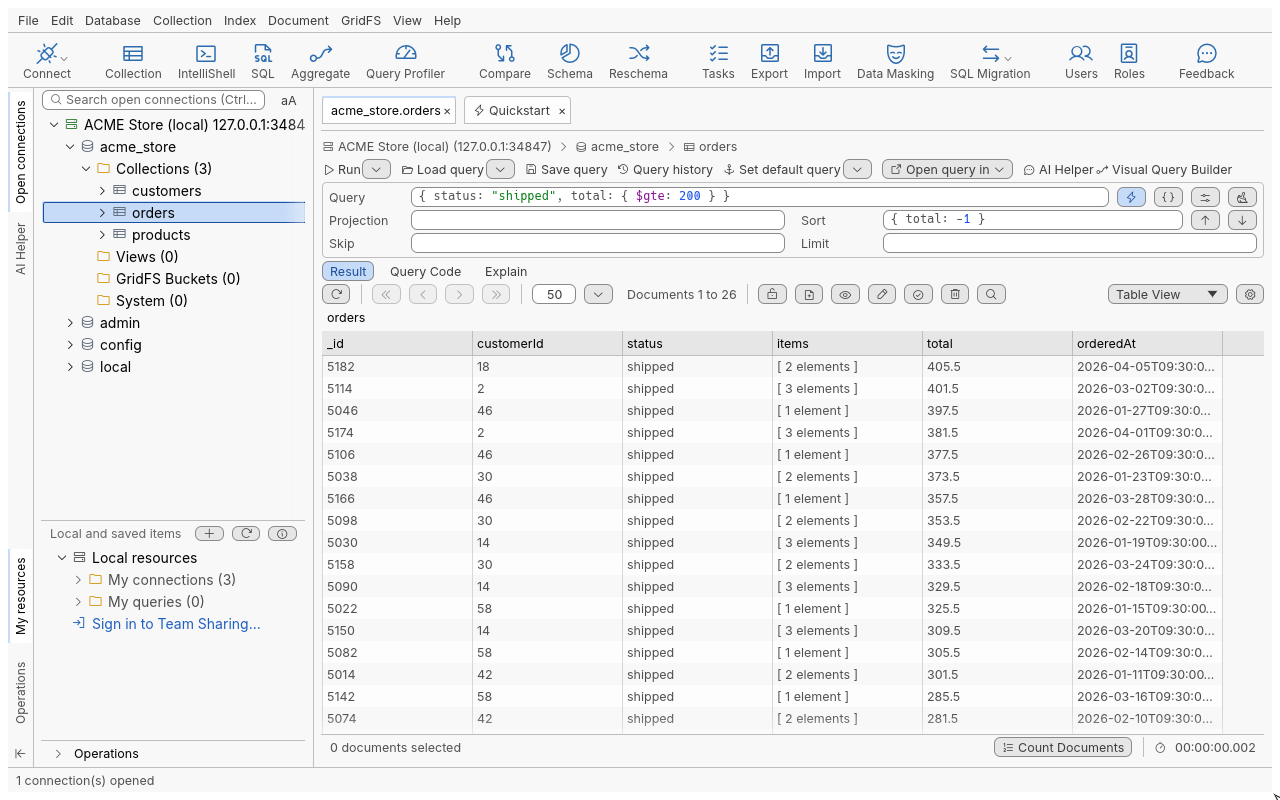
Run a query
- Open a collection: double-click it in the connection tree, or select it and press Enter.
- Click in the Query field and type a filter, for example
{ status: "shipped", total: { $gte: 200 } }. - Optionally fill Projection, Sort, Skip and Limit (see the table below).
- Press Enter in any field (or F5 anywhere in the tab), or click Run.
The tab returns to the first page and shows Documents 1 to 50 (or your page size). Use the paging
buttons to move through the result; see Page through results.
The query is not rewritten when it runs: what you typed stays in the fields, exactly as typed.
The fields
| Field | What it holds | Empty means |
|---|---|---|
| Query | The filter, as a document: { "address.city": "Springfield" } | Every document ({}) |
| Projection | Fields to include (1) or exclude (0): { name: 1, total: 1 } | Every field |
| Sort | Fields and directions, 1 ascending, -1 descending: { total: -1 } | Natural order |
| Skip | How many documents to leave out first (a whole number) | 0 |
| Limit | The most documents to return (a whole number; 0 is no limit) | No limit |
The arrows next to Sort (Sort ascending, Sort descending) set every direction of the
current sort to 1 or -1 and run; with an empty Sort they sort on _id.
What you can type
Query, Projection and Sort accept the relaxed syntax of the MongoDB shell, not only strict JSON:
- unquoted field names, including dotted paths (
address.city); - single- or double-quoted strings, trailing commas,
//and/* */comments; - type constructors:
ObjectId("…"),ISODate("2026-01-05"),NumberInt(5),NumberLong(…),NumberDecimal("19.99"),UUID("…"),Timestamp(…),BinData(…)and others; - regular expressions:
{ name: /^chef/i }; - Extended JSON wrappers such as
{ "$oid": "…" }or{ "$date": "…" }, so text copied from the JSON View reads back exactly; - date tags, which become a date range when the query runs:
{ orderedAt: #today },#last7days,#thiscalmonth,#lastyearand others. The tag stays in the field, history and saved queries; each run computes the range again.
_id shortcuts
Type a value on its own in Query and it becomes a filter on _id when the query runs:
| You type | The query becomes |
|---|---|
| 24 hexadecimal digits | { "_id" : ObjectId("…") } |
| A UUID (8-4-4-4-12 hex digits) | { "_id" : UUID("…") } |
A whole number, e.g. 5001 | { "_id" : 5001 } |
Quoted text, e.g. "SKU-1001" | { "_id" : "SKU-1001" } |
The field keeps the expanded filter so you can see what ran.
More ways to run
Click the arrow next to Run (More ways to run):
| Item | What it returns |
|---|---|
| findOne(…) | The first document of the query (filter, projection, sort, skip and options) |
| count(…) | The number of documents matching the filter, ignoring Skip and Limit |
Count Documents in the status bar counts the full result of the last run (with its Skip, Limit, collation and hint). Nothing is counted until you ask: large collections page without a count.
Query toolbar
| Button | Shortcut | What it does |
|---|---|---|
| Run | Enter in a field, F5 | Runs the query from the first page |
| Load query | Ctrl+O | Lists saved queries; Open Query Manager at the bottom |
| Save query | Ctrl+S | Saves the five fields and options under a name (details) |
| Query history | Every query you ran, newest first | |
| Set default query | Runs this query whenever this collection opens; the arrow offers Clear Default Query and Restore Default Query | |
| Open query in | Opens the query in the Aggregation Editor or in IntelliShell | |
| Visual Query Builder | Ctrl+B | Builds the query from rules (details) |
At the right of the Query field:
| Button | What it does |
|---|---|
| Toggle autocompletion suggestions | Suggestions as you type, on or off; Ctrl+Space opens them either way |
| Query JSON Editor | Edits the filter on several lines, with Validate, Format JSON and Enable word wrap; Run puts the text back in Query and runs |
| Find Query Options | Allow disk use and a custom collation (below) |
| Clear Query | Empties the five fields without running; the options stay |
Find Query Options
The options apply to every find and count of the tab, and are saved with history entries, saved queries and default queries. They need MongoDB 4.4 or later.
| Option | Values |
|---|---|
| Allow disk use | Lets the server use temporary files for large sorts |
| Use custom collation | Turns the collation on; then: |
| Locale | Required, for example en or fr |
| Strength | 1 Primary (base characters only) to 5 Identical; 3 Tertiary is the default |
| Use Case-Level, Case-First | Case handling: upper, lower or off |
| Numeric Ordering | Compares digit strings as numbers |
| Alternate, Max-Variable | Whether spaces and punctuation count (non-ignorable or shifted; punct or space) |
| Backwards, Normalization | Advanced collation settings |
Options take effect from the next run.
Default query
A default query belongs to one collection on one connection, on this computer.
- Type the query you want to see every time.
- Click Set default query. The status bar says Default query set.
- The next time the collection opens, that query loads and runs.
To go back to all documents, choose Clear Default Query from the arrow next to Set default query. Restore Default Query brings back the last one you cleared and runs it. A history entry can also become the default: select it in Query History and click Set As Default Query.
Tips
- Paste a whole shell statement into Query, such as
db.orders.find({ status: "pending" }, { total: 1 }).sort({ total: -1 }).limit(20): each part goes to its field.findOnesets Limit to 1. Statements that are not a find (remove,.map(…)) are refused with the reason. - The fields support Undo (Ctrl+Z) and Redo, highlight matching brackets and colour the syntax.
- Press the Down arrow in the Query field to search your query history for what you typed.
Troubleshooting
| Message | Meaning |
|---|---|
query: expected a value, found } (line 1, column 13) | The field does not read; the line and column point at the problem. Nothing was sent to the server. |
| Skip must be a whole number, 0 or more | Skip and Limit take whole numbers only. |
| Find Query Options need MongoDB 4.4 or later | The server is older; clear the options. |
unknown date tag #todays | A tag that does not exist; check its spelling. |
| A server error with a code | The query read correctly but the server refused it (an unknown operator, a bad regular expression). Your fields stay as they were. |