Reuse queries: history and saved queries
Find any query you ran in the Query History, save queries by name, organise them in folders with the Query Manager, and load them again.
Every query you run is kept in the Query History. Queries you want to keep under a name go to the Query Manager, in folders. Both work for collection queries, aggregation pipelines, SQL statements and IntelliShell scripts.
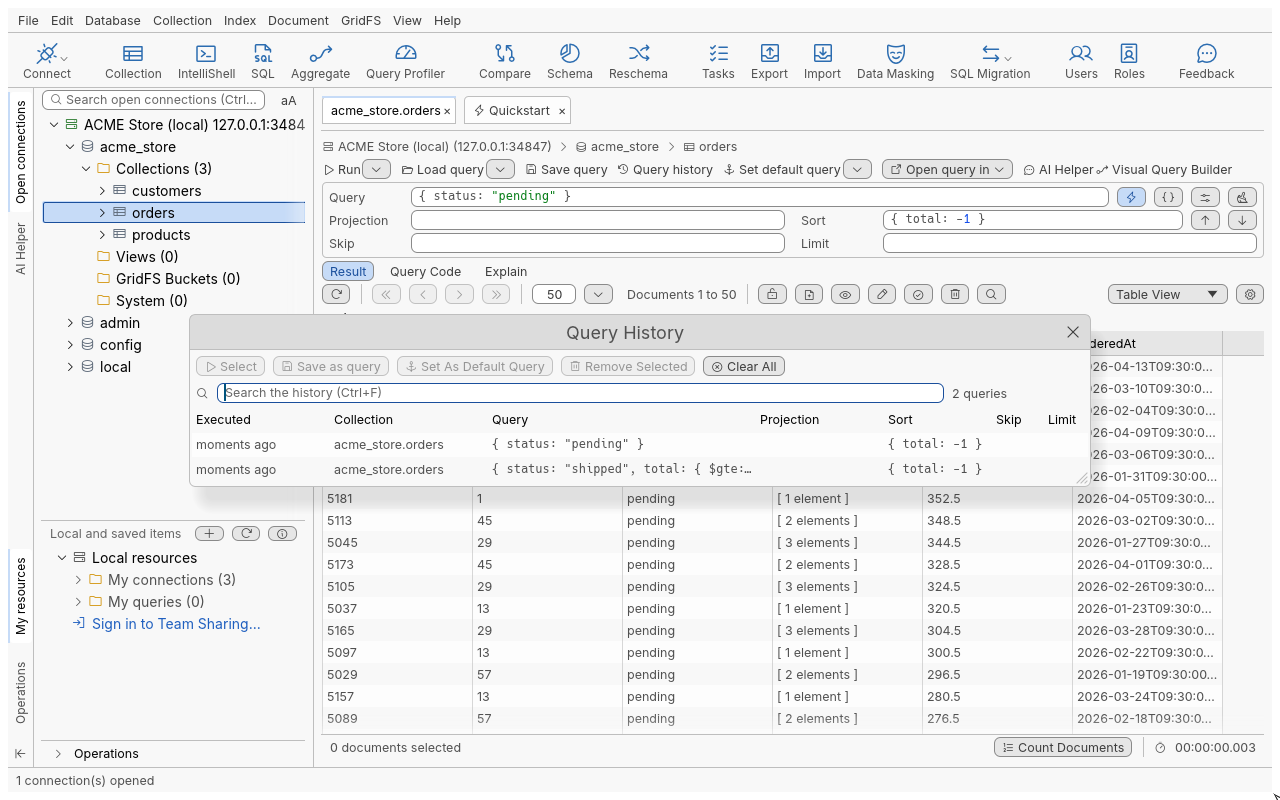
Find a query you ran
- In a Collection Tab, click Query history in the query toolbar (or press the Down arrow in the Query field to search the history for what you typed).
- Entries are listed newest first, with their target (connection, database, collection) and when they ran. Type in the search box (Search the history (Ctrl+F)) to filter by query text, database or collection.
- Select an entry to preview it, then press Enter or double-click (Select): it loads into its tab (or a new Collection Tab on its collection) and runs.
Running the same query on the same collection again moves its entry to the top instead of adding a copy. Opening a collection and paging are not recorded.
| Command | Shortcut | What it does |
|---|---|---|
| Select | Enter | Loads the entry and runs it |
| Remove Selected | Delete | Removes the selected entries |
| Clear All | Shift+Delete | Removes every entry, after confirmation (cannot be undone) |
| Save as query | Saves the entry in the Query Manager | |
| Set As Default Query | Makes it the collection’s default query | |
| Search | Ctrl+F | Filters the list |
The history holds 1,000 entries by default; set Maximum query history size: (1 to 100,000) in Edit > Preferences (Ctrl+P), General page. The oldest entries go first. A query over 1 MiB runs but is not recorded.
The Aggregation Editor, SQL Query and IntelliShell (Script History and Browser) have their own history lists, opened from their toolbars.
Save a query
- Write the query in the query bar.
- Click Save query or press Ctrl+S.
- Type the Query name: and choose a folder.
- Tick Save target details (connection, database and collection) to remember where it runs.
- Click Save. The status bar says Query “…” saved.
A name already used in the same folder is refused (Name is already in use: overwrite that query, or choose another name), unless you choose Overwrite.
The query bar’s fields and the Find Query Options are saved, including date tags as typed.
Load a saved query
- In a Collection Tab, click Load query (Ctrl+O): the menu lists saved queries; pick one to load and run it in this tab. Open Query Manager opens the full list.
- In the Query Manager, select a query and click Load (Enter). A collection query runs in a Collection Tab on its saved target, or on the collection you choose. A SQL query opens in a new SQL Query tab, an aggregation in the Aggregation Editor, and an IntelliShell script in a new IntelliShell tab (not run) on the server, database or collection you pick.
Organise queries in the Query Manager
| Command | Shortcut | What it does |
|---|---|---|
| New query | Creates a query by hand: name, location, Query type: (Collection query, IntelliShell script, SQL Query, Aggregation query), target, text | |
| New folder | Creates a folder (folders can be nested) | |
| Quick edit / Edit query | Ctrl+E | Changes name, folder, fields and target |
| Rename | F2 | Renames the query |
| Duplicate | Copies it as name (1), name (2)… | |
| Delete | Delete | Deletes it, after confirmation |
| Show info pane | Shows the selected query’s preview | |
| Remove query target | Forgets its connection, database and collection | |
| Show Queries from: | Shows one folder, or Show All folders | |
| Search | Ctrl+F | Search saved queries by name and text |
Drag a query onto a folder to move it.
With Team Sharing, saved queries can also live in shared folders; that is covered with team features.
Troubleshooting
- A saved collection query does not run where I expect: it runs on its saved target. Edit the query (Ctrl+E) to change the target, or Remove query target to choose each time.
- “The history entry is gone”: it was removed or dropped as the history reached its maximum size.
- A query is missing from the history: queries over 1 MiB are not recorded, and only queries you ran (not pages you browsed) are.