Build a query visually
Assemble a filter, projection and sort from conditions and groups, or by dragging cells from the result, without writing JSON.
The Visual Query Builder is a panel beside a Collection Tab’s result. You add conditions (field, operator, value) and groups of conditions; the builder writes the matching query into the query bar as you go. It also reads the bar back, so you can switch between typing and building at any time.
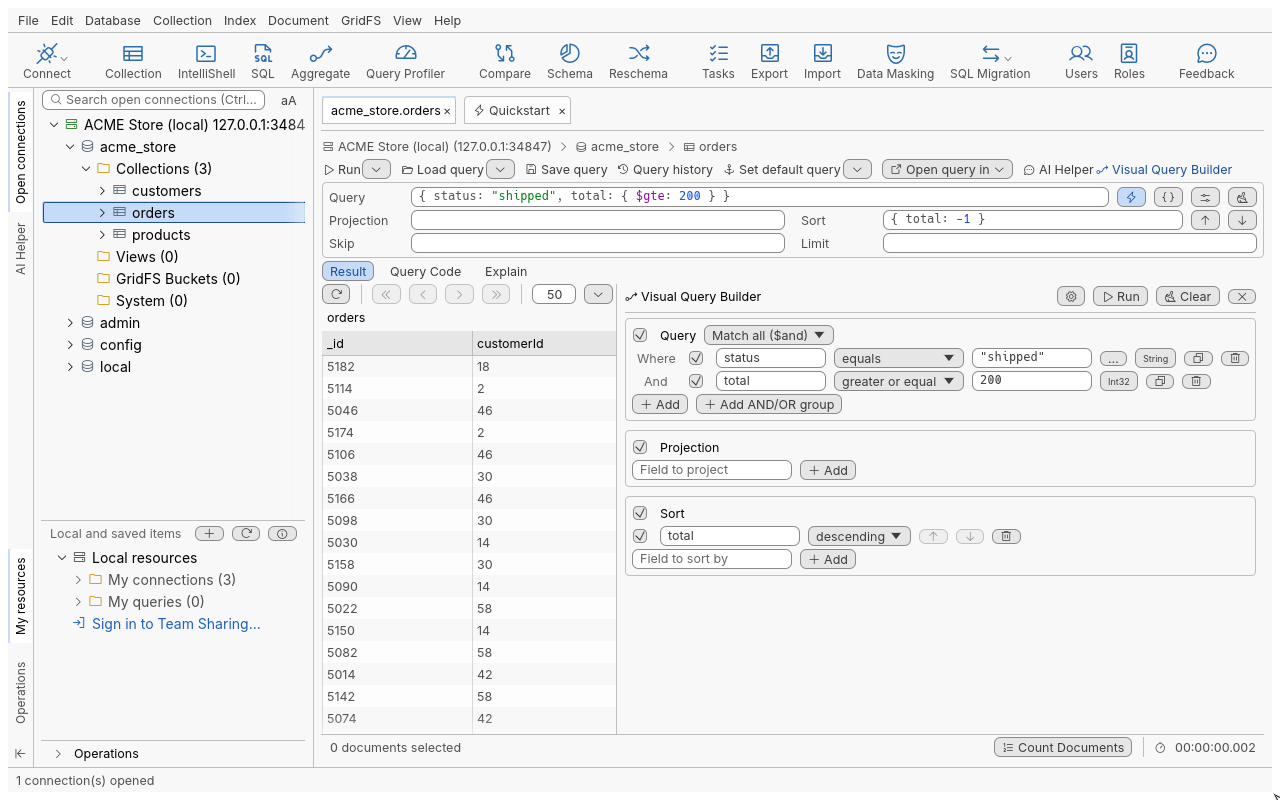
Open and close it
- Press Ctrl+B in a Collection Tab, click Visual Query Builder in the query toolbar, or choose Collection > Show Visual Query Builder.
- Press Ctrl+B again, or click Hide Visual Query Builder, to close it. The panel keeps its width.
The builder is also available in IntelliShell (see IntelliShell).
Build a filter
- Open the builder (Ctrl+B).
- Under Query, click Add condition.
- In Field, type the field name (
status, or a dotted path such asaddress.city). Field names of the collection are suggested as you type. - Choose the operator (for example greater or equal) and type the Value.
- Add more conditions. To mix AND and OR, click Add AND/OR group and pick Match all ($and), Match any ($or) or Match none ($nor) for the group.
- Optionally click Add projection field and Add sort field.
- Click Run query (or Run in the query bar, F5).
The builder never runs by itself: each change updates the query bar text, and Run runs it.
Operators
| Operator | Writes |
|---|---|
| equals, not equals | the value, or $ne |
| greater than, greater or equal, less than, less or equal | $gt, $gte, $lt, $lte |
| in, not in | $in, $nin (a bare list is wrapped in [ ]) |
| exists, doesn’t exist | $exists |
| contains, starts with, ends with | a regular expression (/text/, /^text/, /text$/) |
| Has array element(s) matching | $elemMatch on the conditions inside it |
| (custom) | any expression, written as you type it |
What the builder has no row for (several operators on one field, $expr, a regular expression with
options) is kept as a (custom) condition, so reading the bar back never loses anything.
Values
Values are shell text, so their type is kept: 5, "5", NumberInt(5) and
ISODate("2026-01-05") are different values, and each condition shows the type it detected. Date
tags (#today, #last7days) stay tags and expand when the query runs.
The … button (Open the value editor) opens a dedicated editor for some types:
| Value type | Editor |
|---|---|
| Text | Multiline Editor: Text, with Enable word wrap |
| Binary data | Binary Editor: subtype, Base64 or Hex |
| Reference (DBRef) | Reference (DBRef) Editor: collection, id, optional database |
| Regular expression | Regular Expression Editor, with the options Case insensitive (i), Multiline: ^ and $ match at line breaks (m), Extended: ignore white space (x) and Dot matches new lines (s) |
Drag and drop
- Drag a cell from the Table View onto Query or onto a group: it becomes an equals condition with that field and value.
- Drop a cell onto an existing condition to replace its field and value (the operator stays).
- Drag column headers or cells onto Projection or Sort to add those fields.
- In the Tree View, Ctrl+click several nodes and drag them together.
Embedded documents and arrays cannot be dropped as conditions; the builder says so.
Reference
| Control | What it does |
|---|---|
| Enable query, Enable projection, Enable sort | Turn a whole panel on or off without deleting it |
| Enable condition, Enable group | Turn one condition or group off |
| Clone condition | Copies a condition below itself |
| Remove condition, Remove group | Deletes it |
| Move up, Move down | Orders projection and sort fields |
| Clear | Empties the builder |
| Complete field names while typing | Turns field-name suggestions on or off |
Troubleshooting
- A condition shows an error and the bar did not change: a condition is missing its field or value, or a custom expression does not read. Finish or remove it; the bar keeps the last valid query.
- “This is not a valid … value” in a value editor: the text does not read as that type; OK is refused until it does.
- The builder will not update: the query bar holds text that does not read. Fix the bar first.