Query MongoDB with SQL
Write SELECT statements against MongoDB collections: what SQL Query supports, how it translates to find and aggregate, and what it refuses.
SQL Query lets you write SELECT statements against MongoDB collections. Each statement is
translated, literally and in the order you wrote it, into a MongoDB find or aggregation pipeline,
then run. You can see the translation, explain it, or move it to the Aggregation Editor.
SQL Query only reads. It never changes data.
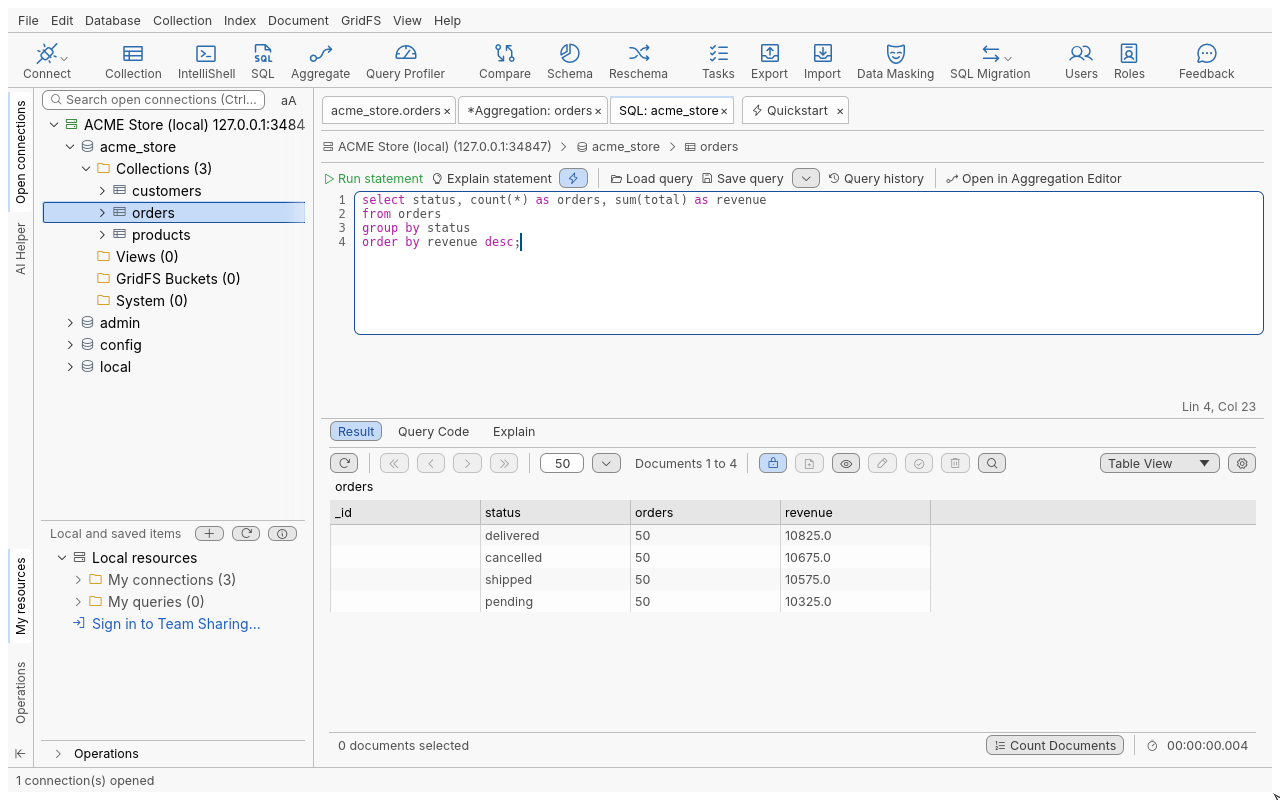
Run a SQL statement
-
Select a database or a collection in the connection tree.
-
Press Shift+Ctrl+L, click SQL in the toolbar, or right-click and choose Open SQL. Opened on a collection, the editor holds
select * from <collection>;. -
Write your statement, for example:
select status, count(*) as orders, sum(total) as revenue from orders group by status order by revenue desc; -
Put the cursor in the statement and press F5 (Run statement).
Only the statement at the cursor runs. Separate statements with ;; with the cursor between two
statements, the one before it runs. The result opens in the Result sub-tab with the usual Table,
Tree and JSON views and paging.
What you can write
| SQL | Becomes |
|---|---|
SELECT * FROM c with WHERE, ORDER BY, LIMIT n [OFFSET m] or LIMIT m, n | find() with a filter, sort, skip, limit |
SELECT a, b AS x FROM c | A projection; _id is left out unless you select it |
Plain, dotted (address.city) or quoted field names (`name` or [name]) | Field paths; array positions need brackets: [items.0.sku] |
=, <>, <, <=, >, >=, AND, OR, NOT, parentheses | Query operators |
LIKE, NOT LIKE with % and _ | A case-insensitive regular expression |
IN, NOT IN, BETWEEN, NOT BETWEEN, IS NULL, IS NOT NULL, true, false | $in, $nin, ranges, null tests |
Comparing two fields (WHERE a.qty > a.min) | $expr |
A JSON document in WHERE (WHERE { status: "pending" }, WHERE total > { … }) | Used as written |
MongoDB constructors: ObjectId(…), NumberInt, NumberLong, NumberDecimal, ISODate, UUID, Timestamp, BinData and others | The typed value |
date('2026-01-05'), with or without a time and zone | A date (no zone means UTC) |
SELECT DISTINCT | $group then $project |
GROUP BY, HAVING, COUNT(*), COUNT(f), SUM, AVG, MIN, MAX | $group, $match, $sort, $skip, $limit, $project |
[INNER] JOIN … ON a.x = b.y, LEFT [OUTER] JOIN, CROSS JOIN, FROM a, b | $lookup and $unwind; each collection’s document nests under its alias |
Rules to keep in mind:
- With joins, qualify every field (
o.total,c.name);collA.*is refused; a self-join needs aliases. - With
GROUP BY, every selected field must be grouped or aggregated. Output fields are named after the alias, or after the function (COUNT(*)). - With
DISTINCT,ORDER BYmay only use selected fields.
What is not supported
These are refused with a message naming the construct and its position:
| Not supported | Instead |
|---|---|
INSERT, UPDATE, DELETE, DROP and anything but SELECT | Edit documents in the result, or use IntelliShell |
UNION, INTERSECT, EXCEPT | Run the statements separately |
Subqueries (in FROM, IN (SELECT …), EXISTS) | The Aggregation Editor ($lookup with a pipeline) |
WITH (common table expressions) | The Aggregation Editor |
Window functions, DISTINCT ON, COUNT(DISTINCT …) | The Aggregation Editor |
Arithmetic in values (total * 2) | The Aggregation Editor |
USING and NATURAL joins, RIGHT and FULL joins | Rewrite with ON and INNER or LEFT JOIN |
| Other SQL functions | The Aggregation Editor |
Limits: 1 MiB of SQL text, 64 levels of nesting, 10,000 values or conditions.
The SQL Query toolbar
| Button | Shortcut | What it does |
|---|---|---|
| Run statement | F5 | Translates and runs the statement at the cursor |
| Explain statement | Opens Visual Explain on the translation; Run full explain is safe, as translations never write | |
| Open in Aggregation Editor | Opens the translation’s stages in a new Aggregation Editor tab | |
| Load query | Ctrl+O | Opens a .sql file |
| Save query | Ctrl+S | Saves the SQL to the Query Manager |
| Save as query | Shift+Ctrl+S | Writes a .sql file (Save SQL Query as…) |
| Query history | Every SQL statement you ran, newest first; Load puts one back in the editor | |
| SQL Query Auto-suggest | Ctrl+Space opens suggestions | Suggestions as you type, on or off |
The Query Code sub-tab shows the translation of the statement at the cursor in every Query Code language.
Editing the result
A plain SELECT * FROM c (or a select that keeps _id and every field under its own name) gives an
editable result, like a Collection Tab. GROUP BY, DISTINCT, aggregate functions, joins and aliases
give a read-only result, since those rows are not documents of the collection. On a
read-only connection results are always read-only.
Troubleshooting
| Message | What to do |
|---|---|
| SQL Query runs SELECT statements only | Only SELECT runs. To change data, edit the result documents or use IntelliShell. |
| … is not supported by SQL Query | See the table above for an alternative. |
| An error with a line and column | A syntax error; the position is in the whole editor text. |
| A field neither grouped nor aggregated | Add it to GROUP BY or wrap it in an aggregate function. |
| No rows, but you expected some | LIKE and = compare types: '5' does not match the number 5. Dates need date('…') or ISODate(…). |