See how a query runs with Visual Explain
Draw the server's query plan as a diagram of stages, with documents passed on, time and data read, to find slow scans and missing indexes.
Visual Explain draws how the server runs your query: one block per stage of the winning plan, read from left to right, with arrows carrying the number of documents passed from one stage to the next. Use it to see whether a query uses an index or scans the whole collection.
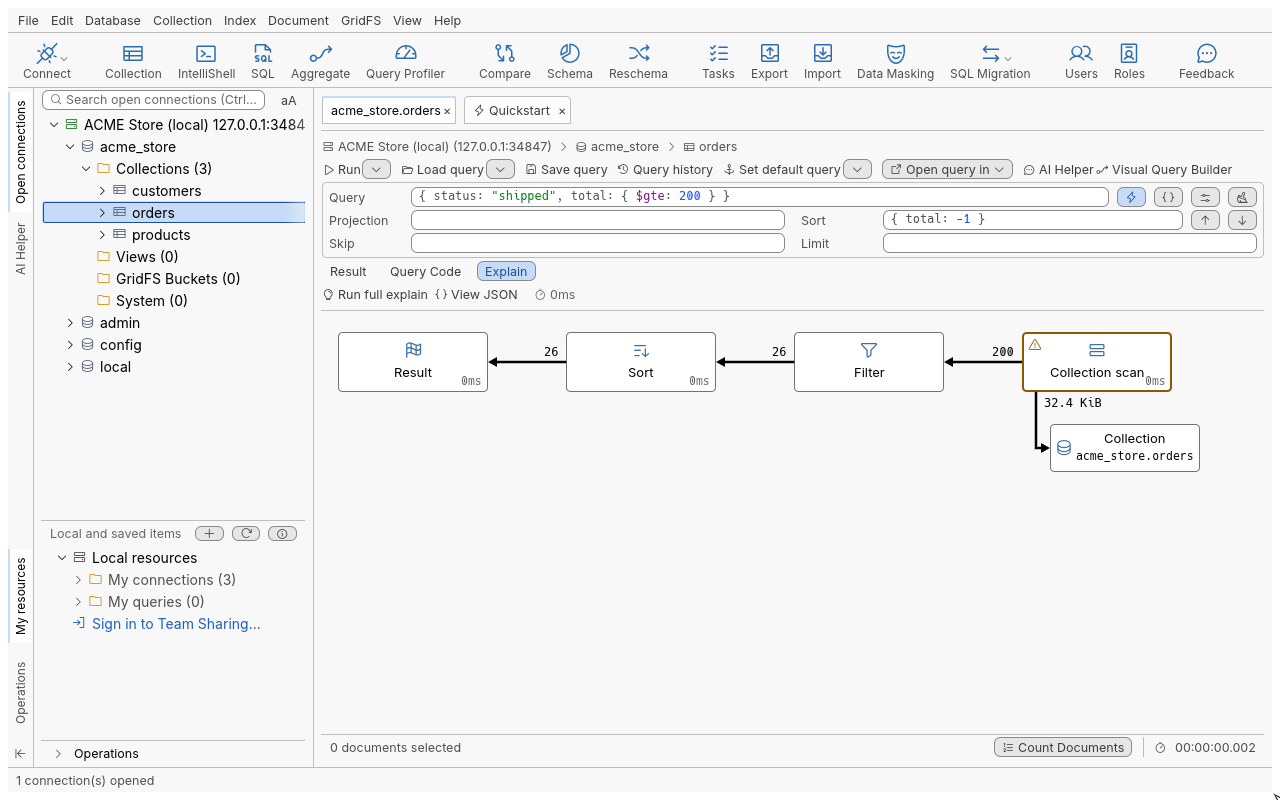
Explain a query
- Write a query in the query bar of a Collection Tab.
- Click the Explain sub-tab (next to Result and Query Code). A brief explain runs: it shows the plan without executing the query, so it is fast and safe on any collection.
- Click Run full explain to execute the query and add figures: documents passed on, time per stage and estimated data read.
The same diagram appears for an aggregation (Explain pipeline, F8, in the Aggregation Editor) and for a SQL statement (Explain statement in SQL Query).
Brief and full
| Mode | What runs on the server | Shows |
|---|---|---|
| Brief (default) | The plan only; the query is not executed | The stages and the indexes chosen |
| Run full explain | The query is executed | Plus documents passed on, time per stage, data read |
A full explain of a pipeline that writes ($out, $merge) is refused, as running it would write.
While it runs, Stop (Cancel the explain) kills the operation on the server.
Reading the diagram
| Block | Meaning |
|---|---|
| Collection scan | Reads every document of the collection. Flagged: on a large collection, this usually means a missing index |
| Index scan | Walks an index between the bounds the query allows |
| Fetch document | Reads the full document for each index entry |
| Filter | Keeps the documents that match the part of the query applied there. The arrow in carries the documents examined, the arrow out those that matched |
| Sort | Sorts in memory (or on disk when allowed); it needs all its input first |
| Sort key generator, Sort merge | Prepare or merge sorted input |
| Projection | Shapes documents to the requested fields |
| Limit, Skip | Stop after, or drop, a number of documents |
| Lookup by _id, Express lookup | Direct access to one document |
| Count scan, Distinct scan | Answer from the index alone, without reading documents |
| Shard merge, Single shard, Sharding filter | Sharded clusters: one branch per shard, with its own figures |
| Result | What the query returns, with the total time |
Other stages keep the server’s own name. Each block’s time is its own share, not the running total. Data read is an estimate: documents examined times the average document size (or keys examined times the average index entry size).
Aggregations add one block per pipeline stage after the query part. Servers before MongoDB 4.4 give figures for the initial query only; the diagram says so.
Tools
| Item | Where | What it does |
|---|---|---|
| What’s this? | Right-click a block | Explains the stage in plain words |
| View original JSON fragment | Right-click a block | The part of the server’s reply behind that block |
| View JSON | Explain toolbar | The server’s full explain output, with Copy |
Tips
- Compare the arrows around a Filter block: many documents in and few out on a large collection means an index on those fields would help. See the index tools in the connection tree.
- Explain honours the query’s sort, skip, limit, collation and index hint.
- Very large plans are cut after 2,000 blocks, with a note.
Troubleshooting
- An error instead of a diagram: the query does not read, the hint names an unknown index, or the server refused the explain; the message is the server’s.
- “The server’s reply has no plan this view can draw; View JSON shows it.”: an unusual reply (an unknown server or collection type). The raw output is still in View JSON.