Turn a query into code
Generate the current find query, aggregation pipeline or SQL statement as source code for the MongoDB Shell, Node.js, Java, C#, Python, PHP or Ruby.
Query Code shows the query you are working on as a program you can paste into your application or run elsewhere. It is read-only: the code always follows the query, and you change the query, not the code.
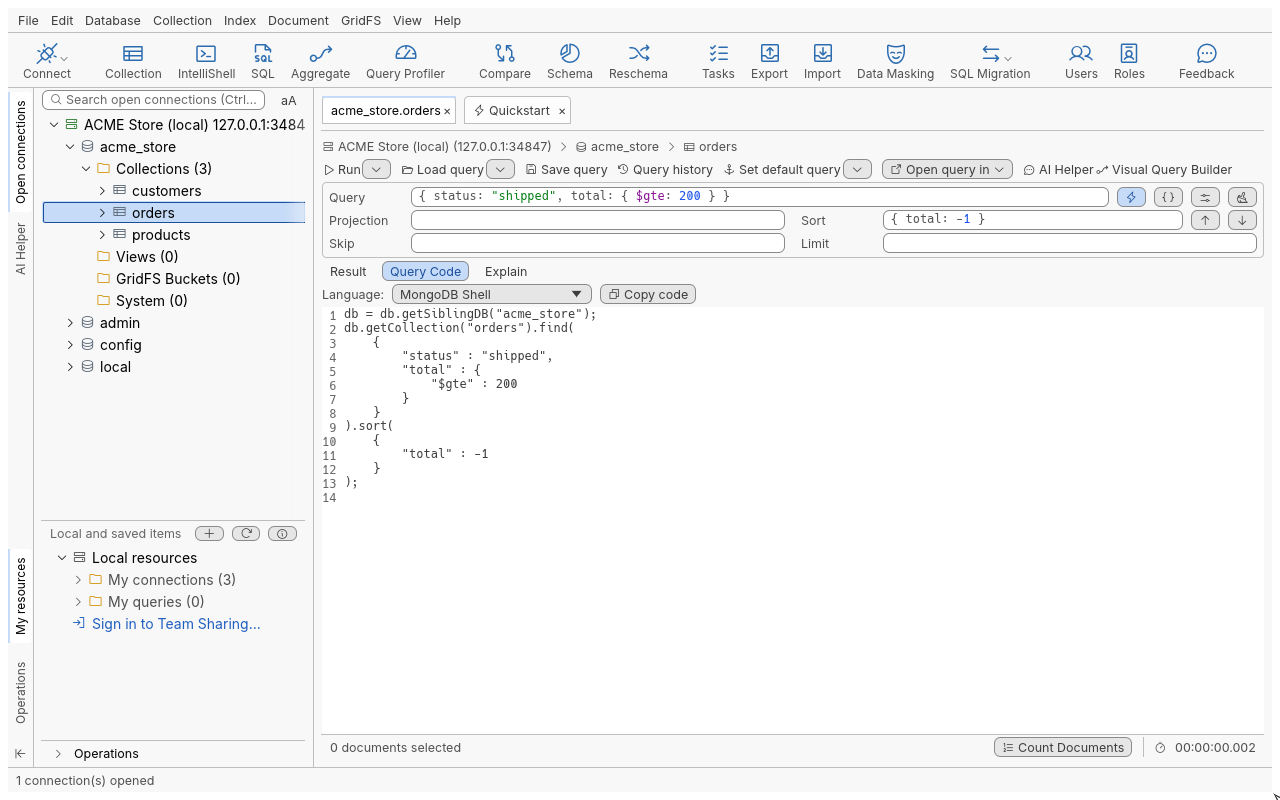
Get the code of a query
- Write and run a query in the query bar (or build a pipeline in the Aggregation Editor, or a statement in SQL Query).
- Click the Query Code sub-tab next to Result, or press Ctrl+G.
- Pick a language in Language:.
- Click Copy code to put the code on the clipboard. In the Aggregation Editor and SQL Query, with MongoDB Shell selected, Open in IntelliShell opens the code in a new IntelliShell tab (from a Collection Tab, use Open query in > IntelliShell in the query toolbar).
Languages
| Language | Notes |
|---|---|
| MongoDB Shell | Runs as is in IntelliShell or mongosh |
| JavaScript (Node.js) | Uses the official Node.js driver |
| Java (2.x driver API), Java (3.x driver API), Java (4.x driver API) | One entry per driver generation |
| C# | .NET driver |
| Python | PyMongo |
| PHP | The MongoDB\ PHP classes |
| Ruby | The mongo gem |
What the code contains
- The filter, projection, sort, skip and limit of the query, or every included stage of the pipeline, with the options (allow disk use, collation, hint) you set.
- Every value written with the target language’s own type (dates, ObjectIds, decimals, binary data), so nothing changes type on the way.
- Date tags such as
#todayalready expanded into the dates of the last run. - A placeholder connection string,
mongodb://host:port/: your real one may hold a password, so it is never written into generated code. Replace it before you run the program.
Tips
- In SQL Query, the code is the translation of the statement at the cursor: the easiest way to see how
a
GROUP BYbecomes a$groupstage. - Query Code works on the query you last asked for; run again after editing the bar to refresh it.
Troubleshooting
- The code does not match what I typed: Query Code shows the last query of the tab. Run the edited query first.
- The generated program cannot connect: replace the placeholder connection string with yours.