Mask data
Make a masked copy of a collection (or mask it in place) with field-level techniques: null out, exclude, shuffle, partial masking, regex, random or fixed values.
Data Masking writes a copy of a collection with sensitive fields hidden or replaced. You can use
the copy for tests, demos or analytics. By default, the masked documents go to a new collection
named <collection>_masked, and the source is not changed.
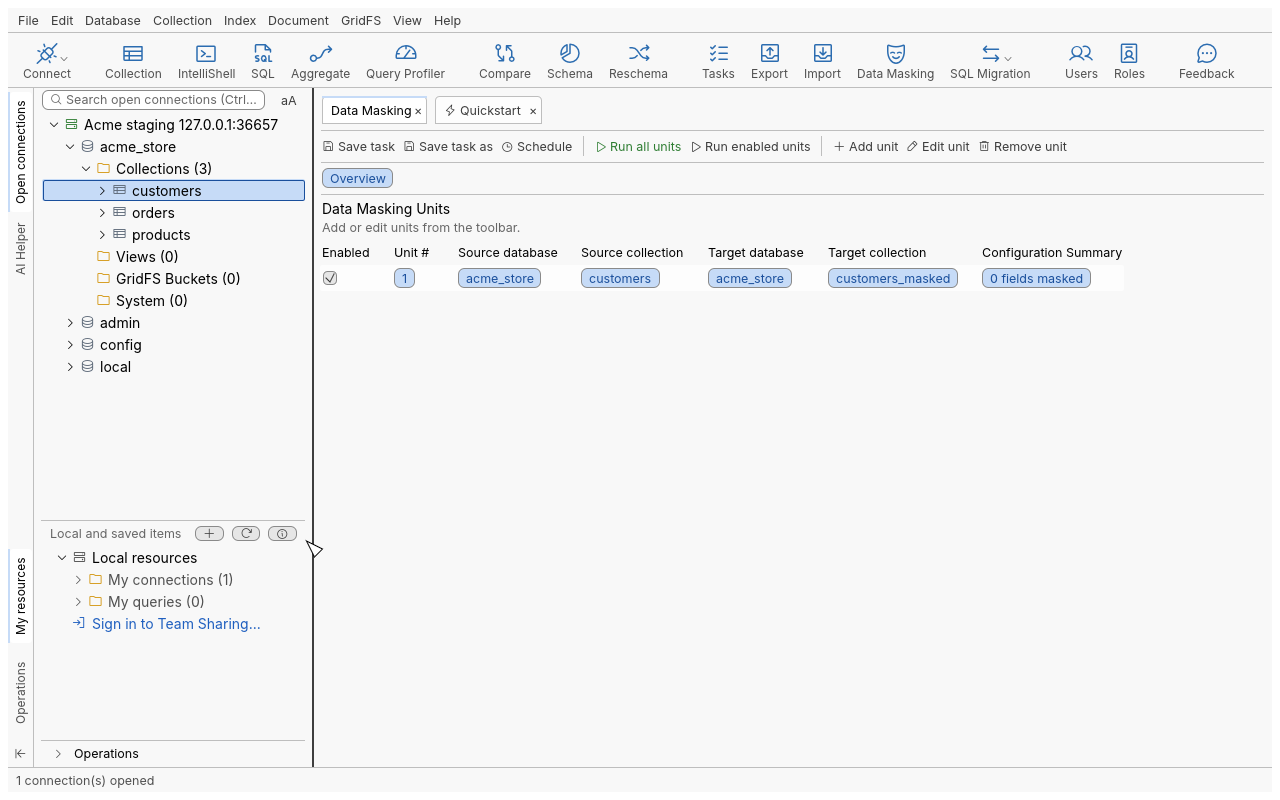
Mask a collection
Example: make a safe copy of acme_store.customers.
- Right-click
customersand choose Mask Collection (on a view: Mask View). You can also use Collection › Mask Collection/View or Data Masking on the global toolbar. A Data Masking tab opens with one unit. Its fields are read from the last 50 documents, and its target iscustomers_masked. - Open the unit (double-click it, or Edit unit). The Mapping Tree lists every field with its type.
- Select
emailand click Edit mask. In Edit Field Mapping, choose Show only first/last characters, keep 2 first characters, and check the preview. - Select
phoneand choose Mask entire string. Selectbirth_dateand choose Substitute with random date and time within a range. Selectnotesand choose Exclude field. - Check JSON Preview: it shows the first documents masked, and nothing is written.
- Click Run all units (or Run enabled units) and confirm.
A field that holds several types gets a technique per type. Select several fields to give them the same mask at once.
Choose the target
- Change Target picks another collection, existing or new, on any connection.
- Change Source picks another source collection. You can keep the current configuration or create a default one.
- Click here to overwrite source masks the source collection in place.
_idis then never masked. The confirmation says that the source documents will be overwritten.
Safety
- A run always asks first. The prompt lists each unit (source, target, server). It warns when the
target already holds documents: masked documents replace those with the same
_id. - A target with the read-only lock is refused before the prompt.
- A target that names the source collection on the same server is refused.
- If the source and target servers cannot be told apart (a second connection to the same server,
an alias, a tunnel), you must type the target’s name to confirm. A run confirmed in advance (a
scheduled task, or a command with
confirm: true) is refused in that case. Run it from the Data Masking tab instead, or choose another target. - Nothing is read or written before the confirmation.
Techniques
| Technique | Effect | Parameters |
|---|---|---|
| Not masked | The value is written as it is | |
| Null out field | The value becomes null | |
| Exclude field | The field is left out | |
| Shuffle | Each document gets another document’s value; the set of values stays the same | |
| Show only first/last characters | Keeps the first or last characters, masks the others | First or last, number of characters |
| Mask entire string | Every character is masked | |
| Mask substrings matching regex | Masks every match of the regex | Pattern, flags |
| Scramble characters | The same characters in a random order | |
| Replace entire field with a fixed string | A fixed string | Value |
| Replace entire field with a random string | Random letters and digits | Length (optional) |
| Substitute value with fixed number | A fixed number of the same type | Value |
| Add percentage to number | Adds a fixed percentage, or a random one in a range | Percentage, or interval |
| Subtract percentage from number | Subtracts a fixed percentage, or a random one in a range | Percentage, or interval |
| Substitute with random date and time | A random date in the range | From, to |
| Substitute with fixed date and time | A fixed date | Value |
| Empty contents of the array | The array is emptied | |
| Negate boolean value | true becomes false and false becomes true | |
| Substitute with fixed boolean value | A fixed boolean | Value |
| Substitute with new ObjectId | A new ObjectId |
Only the techniques that apply to a field’s type are offered. Warn when field value was not changed records an exception when a rule leaves a value as it was.
Other tools of the unit
| Tool | Effect |
|---|---|
| Add child / Add sibling | Adds a field the scan did not see |
| Move up / Move down | Reorders fields in the output |
| Remove mask | Leaves the selected fields unmasked |
| Show all / masked / unmasked fields | Filters the tree |
| Reset Configuration | Removes every mask and every field you added. With Rescan the source collection to detect new fields, it reads the source again (Documents to scan (the last ones): 1 to 100,000). |
| Undo / Redo | Steps through your changes |
| Search configurations | Finds a field or technique in every unit |
| Exception Logs | Values a rule could not handle during the last run |
| History | The changes made to the unit |
The tab can hold several units, one per source collection. Add unit adds one, and Enable unit / Disable unit choose which run with Run enabled units.
Masking during import, export and migration
The import and export wizards also have a Data Masking section with Open field masking editor. Its rules apply to the documents on the way, and the source is not changed (Import data, Export data). So does each unit of a SQL to MongoDB migration (Migrate from SQL to MongoDB).
Save and schedule
Save task keeps the units and their rules. Schedule runs them on a schedule (Automation). A scheduled run of a unit that overwrites its source does so without asking. The task’s confirmation names those units when you schedule it.
Tips
- Prefer a new target collection: keep Click here to overwrite source for copies you already made.
- Shuffle keeps realistic values and distributions, but the values are still real. Combine it with other techniques for direct identifiers.
Troubleshooting
| Problem | What to do |
|---|---|
| “the target collection is the source collection” | Pick another target, or use Click here to overwrite source deliberately. |
| A field is missing from the tree | It is not in the last documents scanned. Add it with Add sibling, or use Reset Configuration with a rescan of more documents (this removes the masks). |
| A scheduled masking task did not run | Its source and target servers cannot be told apart. Run it from the tab and type the target’s name, or change the target. |
| Exceptions after a run | Open Exception Logs: the values a technique could not handle (for example, text in a number field). |