Explain a query
See how the server runs a find query or an aggregation as a diagram of stages, with document counts, times and data read.
Visual Explain draws the server’s plan for a query as a chain of blocks: how the documents are found (a collection scan or an index scan), filtered, sorted and projected, until the Result block. In full mode it also shows how many documents each stage passed on, how long it took and roughly how much data it read. It is the quickest way to spot a missing index or a filter that runs too late.
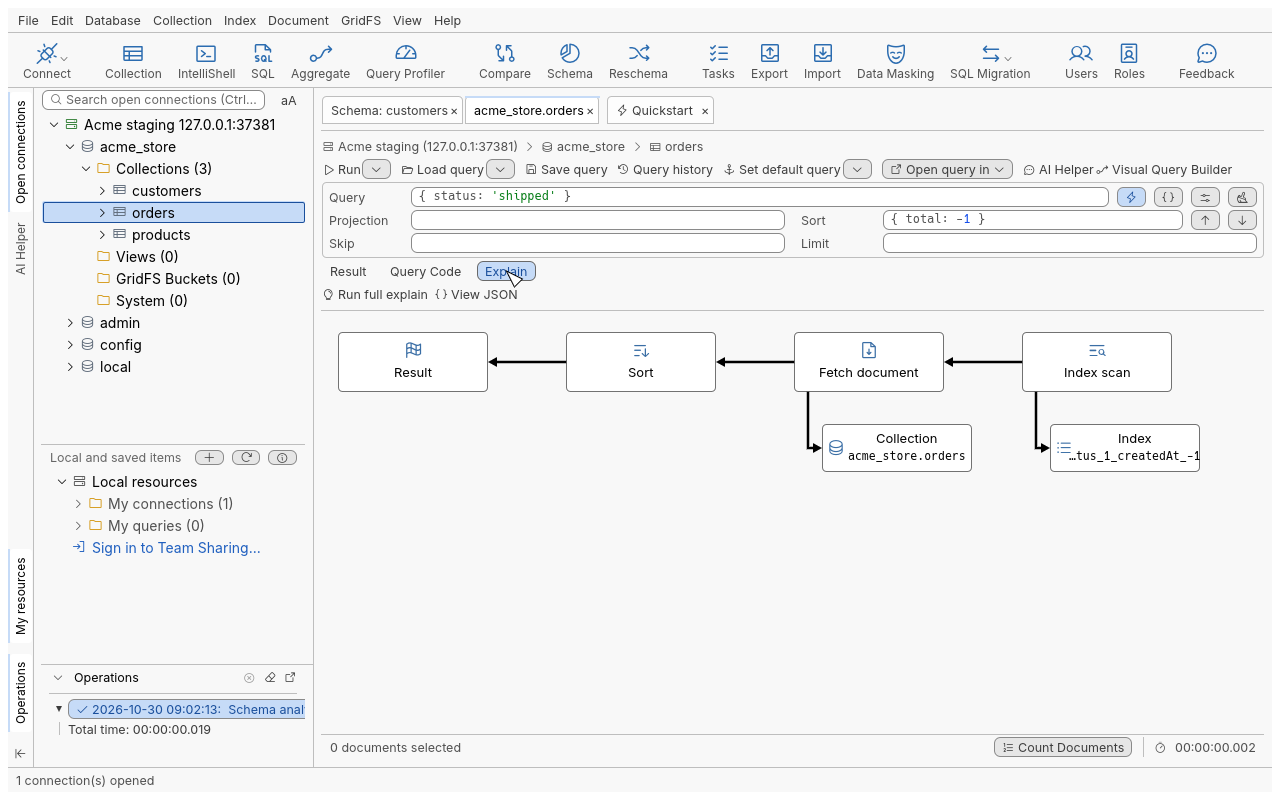
Explain a find query
- Open the collection (for example
acme_store.orders) and type your query in the query bar, for example{ "status": "shipped" }with the sort{ "created_at": -1 }. See Query for the query bar. - Below the query bar, switch to the Explain tab. The plan is drawn at once. With the Explain tab in front, running the query explains the new one too.
- Read the diagram from right to left: the first stage is on the right, arrows lead left to
Result. A scan points down to a Collection block (
acme_store.orders) or an Index block (acme_store.orders.status_1). - Click Run full explain (light-bulb icon) for the figures. Stop cancels it, on the server too.
The default (brief) explain does not run the query: it is fast and safe on any collection. Run full explain runs the query to measure it, which can take as long as the query itself.
Explain an aggregation
In the Aggregation Editor, open the Explain tab at the bottom, or press F8 (Explain
pipeline). Only the stages that are included are explained. Stages that write ($out, $merge) are
never explained, so explaining a pipeline never writes anything; the explained pipeline lists what was
left out.
Visual Explain also opens from a query result of IntelliShell (Explain Query) and from the Query Profiler (Explain plan).
Read the figures
| Where | In full mode it shows |
|---|---|
| On an arrow | The number of documents passed on, in short form (305, 1.0K, 2.5M). Hover for the exact count. |
| In a block | The time spent in that stage alone (0ms, 21ms, 1.6s). |
| On the arrow to a Collection or Index block | The estimated data read (377.6 KiB). Hover for the number of reads and estimated bytes. |
| In the Result block and the toolbar | The total time of the query. |
A filter applied inside a scan is drawn as its own Filter block, so you can see how many documents were examined (the arrow in) and how many matched (the arrow out). On a sharded cluster, each shard has its own branch with its own figures.
Actions
| Action | How | What it does |
|---|---|---|
| Run full explain | Toolbar | Runs the query with execution statistics and adds the figures. |
| View JSON | Toolbar | Shows the server’s complete explain output. |
| What’s this? | Right-click a block | Explains what that stage does. |
| View original JSON fragment | Right-click a block, or double-click it | Shows the part of the server’s output for that stage. |
Tips
- A Collection scan feeding a Filter that keeps few documents is the classic sign of a missing index. Add one (see Manage indexes) and explain again: you should see an Index scan instead.
- A Sort stage after a scan means the sort is done in memory. An index whose order matches the sort removes it.
- Compare the documents examined with the documents returned: a large gap means the index is not selective enough.
- An index hint set in the query is respected by the explain.
Troubleshooting
| Symptom | What to do |
|---|---|
| An error carrying the server’s message | The query, the hint or the collation is invalid, or the server refused the explain. Fix the query and try again. |
| “The server’s reply has no plan this view can draw; View JSON shows it.” | The server answered in an unusual form (for example a special collection type). The JSON is still available. |
| A note says only the initial query has statistics | Servers before MongoDB 4.4 give figures for the first stage of an aggregation only. |
| A full explain refuses the pipeline | The pipeline writes ($out, $merge). Remove that stage, or use the brief explain, which never runs it. |
| A very large plan is cut | Extremely large plans are drawn up to a fixed number of blocks, with a note. View JSON shows everything. |
| Run full explain takes long | It really runs the query. Click Stop to cancel; the operation is stopped on the server. |