Manage indexes
List a collection's indexes with their size and usage, add and edit indexes, hide them from the planner, copy them to another collection, and drop them.
Indexes make queries fast, but each one costs disk space and slows writes down. The Index Manager shows every index of a collection with its type, properties, size and how often it is used, and lets you add, edit, hide, copy and drop indexes from one place.
Open the Index Manager
- In the connection tree, expand the collection (for example
acme_store.orders) and its Indexes folder. - Double-click the Indexes folder, or double-click one index to open the manager with that index selected.
The tab lists, for each index:
| Column | Content |
|---|---|
| Name | The index name, with its fields and their order or type below it. |
| Type | Regular (single-field and compound), Text, Hashed, Wildcard, or the geo type (2dsphere, 2d…). |
| Properties | Compound, Unique, Sparse, TTL, Partial, Hidden, collation… |
| Size | The index size on disk. The total size of all indexes is shown below the list. |
| Usage | How many times the planner used the index, and since when (for example 17 since 2026-10-01T08:15:00). |
Click a column header to sort by it; Size and Usage sort as numbers. Refresh (Ctrl+R) lists the indexes again.
Add an index
- Right-click the collection (or its Indexes folder) and choose Add Index…, or click Add index in the Index Manager’s toolbar. The menu bar has it under Collection › Add Index….
- Under Index name, type a name, or leave it empty: the name is then generated from the fields
(for example
customer_id_1_created_at_-1). - On the Fields tab, pick a field from Indexed fields and its Index type, then add it. The field list is filled from a quick scan of a small sample of the collection; you can also type a field name. Use Move up / Move down to set the order of a compound index, and Remove field to take a field out.
- Set the options you need on the Options, Text options, Geo options and Collation tabs (see the tables below).
- Leave Create in background ticked on a production database.
- Click Create index. The build runs as a job; the dialog shows its progress.
Example: to speed up the “orders of a customer, newest first” query on orders, add customer_id
with 1 (asc) and created_at with -1 (desc).
Edit an index
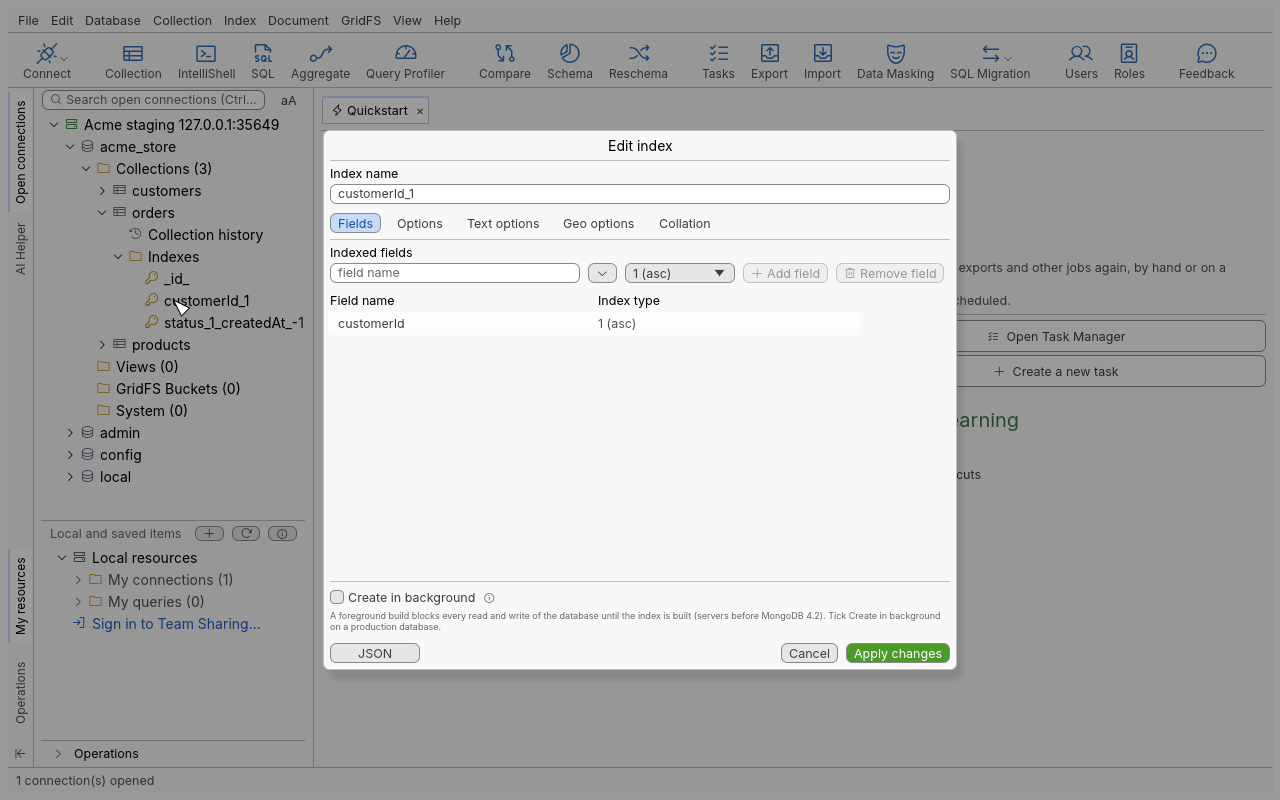
Select an index and click Edit index (or press Enter, or right-click it in the tree and choose Edit Index). The same dialog opens with the index’s definition.
- If you only change Hidden, the button reads Apply changes: the flag is switched without rebuilding the index.
- Any other change requires rebuilding: the button reads Drop and recreate index. The old index is dropped and the new one built. If the new one cannot be built, the original index is restored.
The default _id index can only be viewed.
View an index’s definition and properties
- View details (F3) opens the dialog read-only, with the index JSON.
- Show Properties (right-click an index in the tree) shows its size, usage and properties.
Hide or unhide an index
A hidden index is kept up to date but the query planner ignores it. Hide an index to check what dropping it would do, without the cost of rebuilding it if you change your mind.
Right-click the index and choose Hide Index or Unhide Index, or use the toolbar of the Index
Manager. Hiding needs MongoDB 4.4 or newer; on an older server the button explains why it is not
available. The _id index cannot be hidden.
Copy indexes to another collection or server
- Select one or more indexes and choose Copy Index (Ctrl+C). The definitions are copied as JSON text.
- Right-click the target collection (on any database or server) and choose Paste Index (Ctrl+V). Paste Index appears only while the clipboard holds copied indexes.
- The result lists the indexes created, the ones skipped (the
_idindex always is) and the ones that failed, with the server’s message.
Drop an index
Select one or more indexes and choose Drop Index (Del). A confirmation names the indexes,
the collection and the server; the operation cannot be undone. The _id index cannot be dropped.
Options reference
Fields tab: index types
| Index type | Use |
|---|---|
1 (asc), -1 (desc) | Regular ascending or descending key. |
text | Full-text search on string content. |
2dsphere | Geospatial queries on an earth-like sphere (GeoJSON). |
2d | Geospatial queries on a flat plane (legacy coordinate pairs). |
hashed | Hash of the value, for hashed sharding and equality matches. |
geoHaystack | Legacy geo index; not offered on servers that no longer accept it (MongoDB 5.0 and newer). |
To create a wildcard index, pick $** (all fields) in the field list with type 1 (asc).
Options tab
| Option | Meaning |
|---|---|
| Unique | Rejects two documents with the same key. |
| Sparse | Leaves out documents that do not have the indexed field. |
| Hidden | Invisible to the query planner (MongoDB 4.4 and newer). |
| TTL — Expire after (seconds) | Deletes documents automatically once a date field is older than this. |
| Partial — Partial filter expression | Indexes only the documents that match a filter. |
| Create in background | Builds without blocking reads and writes on servers before MongoDB 4.2 (newer servers always build that way). |
Text options: Default language, Language override, Field weights, Index version.
Geo options: Bit precision (1 to 32, default 26), Lower bound and Upper bound (default -180 and 180), Sphere version, Bucket size (geoHaystack).
Collation: Use custom collation, then Locale (required), Strength, Case level, Numeric ordering.
Tips
- Check the Usage column before dropping: an index used zero times since the last server restart is a good candidate. Hide it first, watch your application, then drop it.
- Use Explain a query to confirm that a new index is actually used.
- To copy a collection’s indexes to a staging server, copy them in one go and paste them on the target collection.
Troubleshooting
| Symptom | What to do |
|---|---|
| The Usage column shows a message instead of figures | Your user lacks the privilege to read index statistics. The other columns stay correct. |
| “No fields found: type the field name” | The sample scan found no fields (empty collection). Type the field name yourself. |
| “TTL: enter the expiry in seconds” | TTL needs a whole number of seconds. |
| “Collation: Locale is required” | Pick a locale, or untick Use custom collation. |
| “Bit precision is from 1 to 32” | Use a value in that range. |
| The build fails with a duplicate key error | Unique was ticked but the collection already has duplicate values. Find them first (an aggregation grouping by the key), or drop Unique. |
| Hide Index is greyed out | The server is older than MongoDB 4.4, or its feature compatibility version is too low. |
| Add, edit, hide or drop is refused | The connection is read-only, or your user lacks the index privileges. |