Run tasks on a remote task runner
Send saved tasks to oxysdb-runner, run them on demand or on a schedule, and choose the runner pool.
The remote task runner (oxysdb-runner) runs your saved tasks (exports, imports, SQL ⇄ MongoDB
migrations, data compare, data masking, reschema, and IntelliShell scripts when allowed) on a server,
so they run on time even when your desktop is off. It is separate from the team server: it holds
database credentials, so it is deployed and secured on its own (see
Self-hosting).
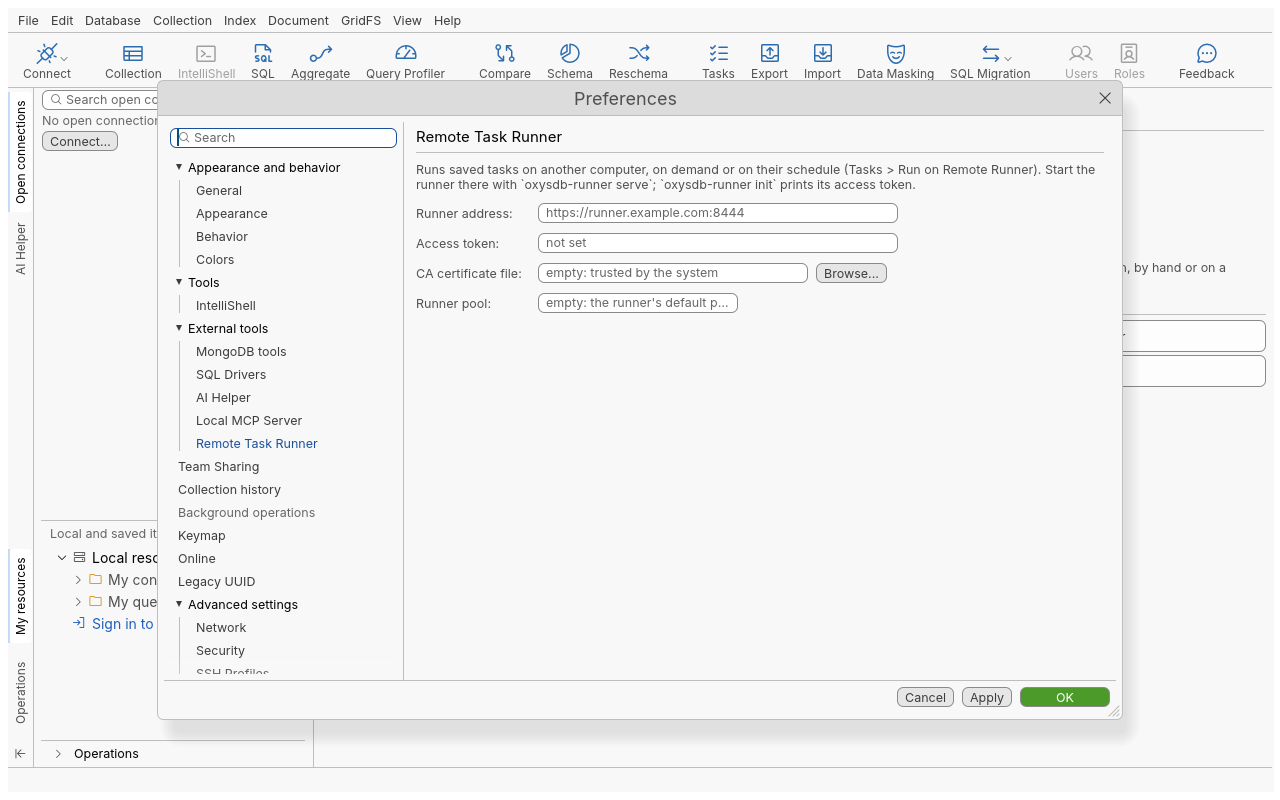
Connect the desktop to the runner
- Ask the administrator for the runner’s address and its access token (printed once by
oxysdb-runner init, or kept in the deployment’s secret). - Open Edit › Preferences › External tools › Remote Task Runner.
- Fill in the fields and click Apply or OK. The runner is asked what it is, so a wrong address or token shows at once.
| Field | Meaning |
|---|---|
| Runner address | https://host:port (default port 8444). http:// only to this computer |
| Access token | Kept in the credential store, never in a file. Type to replace it |
| CA certificate file | The runner’s certificate or its CA, when the system does not trust it (empty: trusted by the system) |
| Runner pool | Which pool runs the tasks you send (empty: the runner’s default pool) |
Send a task
- Save the task first (see Automation).
- In the Tasks view, right-click it and choose Run on Remote Runner.
- The task is sent with the connections it uses, including their saved passwords, over TLS.
- A task with a schedule is sent with it: the runner runs it on time, and the local schedule is turned off so it never runs twice. The status bar says so.
- A task without a schedule runs once on the runner straight away.
Sending a task with the same name again replaces the runner’s copy.
Follow runs
The runner’s state is available as commands, from the command line or an agent (see Automation):
| Command | Gives |
|---|---|
runner.status | The runner’s version, its tasks and the run in progress |
runner.tasks | Each task on the runner with its schedule, next run and last state |
runner.history { task } | The runs (time, trigger, state, duration, error) and the log lines of each run |
runner.run { task, pool?, requestId? } | Runs a runner task now |
runner.delete { task } | Deletes a task from the runner, after confirmation |
Run states: queued, running, done, failed, interrupted (the runner replica stopped during the
run), missed (the occurrence came while no runner could take it).
Pools
A deployment can have several runners grouped in pools. A task runs only on runners of its pool, for example a pool placed next to databases in a separate network zone.
- Set the default pool for what you send in Runner pool (Preferences).
task.run-on-runner { task, pool }andrunner.run { task, pool }choose a pool for one task or one run.- A pull-only pool opens no port at all: its runners only connect out to the shared runner database and to the target databases. You still send tasks to the main runner address; the pull-only runners pick up the runs of their pool.
- Pools place work, they do not separate customers: every runner of a deployment shares one access token and one task list.
Request ids: no double runs
Each run request carries a request id (1 to 64 letters, digits, - or _). If the network fails
and the request is sent again with the same id, the runner answers with the run already queued
(duplicate: true) instead of starting a second one. The desktop picks a random id and retries once
with it by itself; pass requestId to runner.run when you script retries yourself. Sending a task
works the same way: a submission whose outcome is unknown is sent again with its id, never reported as
“not saved”.
What the runner accepts
The access token is a key to the runner: whoever holds it can save and run tasks. So the runner is strict, whatever the desktop sends:
| Check | Default |
|---|---|
| Task types | Every type except IntelliShell Script, which runs code; the administrator must allow it |
| Files | Tasks read and write only inside the runner’s files directory; other paths, .. and symbolic links are refused |
| Programs | A connection choosing its own shell, mongodump or mongorestore executable is refused |
| Runner identity | Kerberos, an AWS role without keys, or an SSH agent of the runner are refused unless the administrator allows them |
| Key and certificate files | Accepted only from the runner’s credentials directory, set by the administrator |
| OIDC | Refused on the runner |
Scheduled IntelliShell scripts run isolated on the runner; see Automation.
Troubleshooting
| Message or symptom | Cause and fix |
|---|---|
| 401 / unauthorized | Wrong or replaced access token: paste the current one in Preferences |
| badRequest when sending a task | A check above refused the task or one of its connections; the message names it. Adjust the task, or ask the administrator to allow it |
A run stays queued | No runner of that pool is running. Check the pool name |
| busy | The runner has too many waiting requests or runs; try again later |
| send the task again or integrity check | The runner was upgraded or its database restored; send the task again from the desktop, or ask the administrator (see upgrades) |
| Offline mode is on: the runner is not contacted. | Turn offline mode off in Preferences |
| Certificate error | Give the runner’s CA in CA certificate file |