Set validation rules
Add, edit or remove a collection's validator, and choose whether invalid documents are rejected or only logged.
A validator is a rule the server checks on every insert and update of a collection. It can be a query
document ({ "price": { "$gte": 0 } }) or a JSON Schema ({ "$jsonSchema": { … } }). The Edit
Validator dialog shows the current validator of a collection, checks your text before sending it, and
saves it together with its validation level and action.
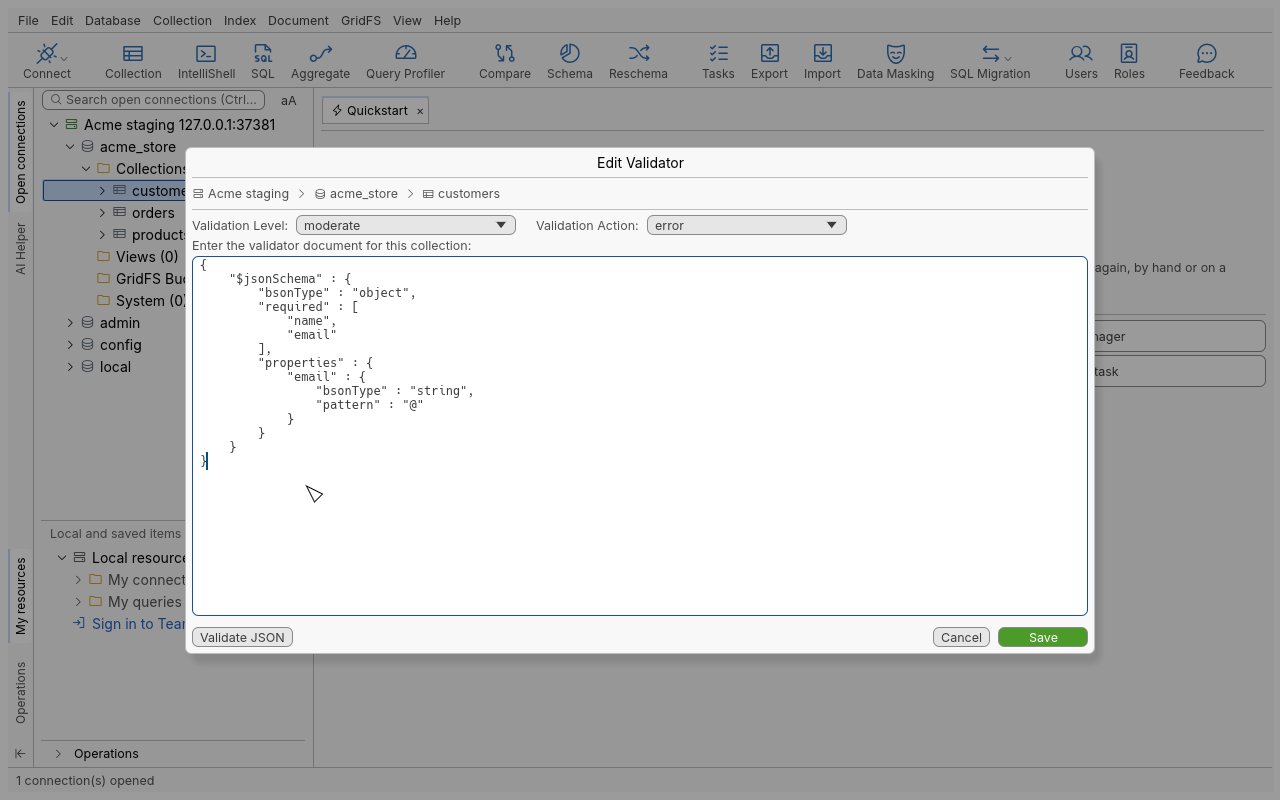
Add or edit a validator
- In the connection tree, right-click the collection (for example
acme_store.products) and choose Add / Edit Validator…. The same entry is in the menu bar under Collection › Add/Edit Validator…. - The dialog shows the current validator, or an empty box if the collection has none. Type or paste the validator document under Enter the validator document for this collection:.
- Click Validate JSON to check the syntax. The dialog says Valid JSON or points at the error.
- Choose the Validation Level and the Validation Action (see below).
- Click Save. The text is checked again before anything is sent; if the server rejects the validator, nothing changes on the server and your text stays in the dialog so you can fix it.
Example for products: every product needs a name and a non-negative price.
Remove a validator
Open Add / Edit Validator…, clear the text box and click Save. An empty validator removes the rule.
Set a validator when creating a collection
The Add Collection… dialog (right-click a database) has a Validator page where you can enter a validator document for the new collection. See Explore for creating collections.
Options
| Option | Values | Default | Meaning |
|---|---|---|---|
| Validation Level | off, strict, moderate | strict | strict checks every insert and update; moderate checks inserts and updates of documents that are already valid, leaving existing invalid documents editable; off disables validation without deleting the rule. |
| Validation Action | error, warn | error | error rejects invalid writes; warn accepts them and records a warning in the server log. |
Tips
- Analyze the collection first to see which fields are really present and with which types: see Analyze a collection’s schema.
- Roll out a new rule with Validation Action
warn, check the server log, then switch toerror. - Use Validation Level
moderateon a collection that still holds old, invalid documents you plan to fix later.
Troubleshooting
| Symptom | What to do |
|---|---|
| Invalid JSON | The text is not a valid document. Fix the syntax shown, then Validate JSON again. |
| The server refuses the validator | The message comes from the server (unknown operator, invalid JSON Schema keyword…). Nothing was changed; correct the text and save again. |
| Save is refused on a read-only connection | Saving a validator changes the collection. Reconnect with a connection that is not read-only. |
| The server reports missing privileges | Changing a validator needs the right to modify the collection (collMod). Ask your database administrator. |
| Inserts fail after saving | Your documents do not match the rule. Switch the action to warn while you fix the data, or adjust the rule. |