Local MCP server for AI agents
Let an AI client on this computer browse, query and analyse your databases through read-only tools, without giving it connection strings or passwords.
The local MCP server lets the AI client you already use (an editor assistant, a coding agent, a chat application: any client that speaks the Model Context Protocol) work with your databases through Oxys DB Studio’s saved connections. The client calls read-only tools: it can list, find, explain and analyse, never insert, update, delete or drop. It never sees a connection string, a server address, a user name or a password.
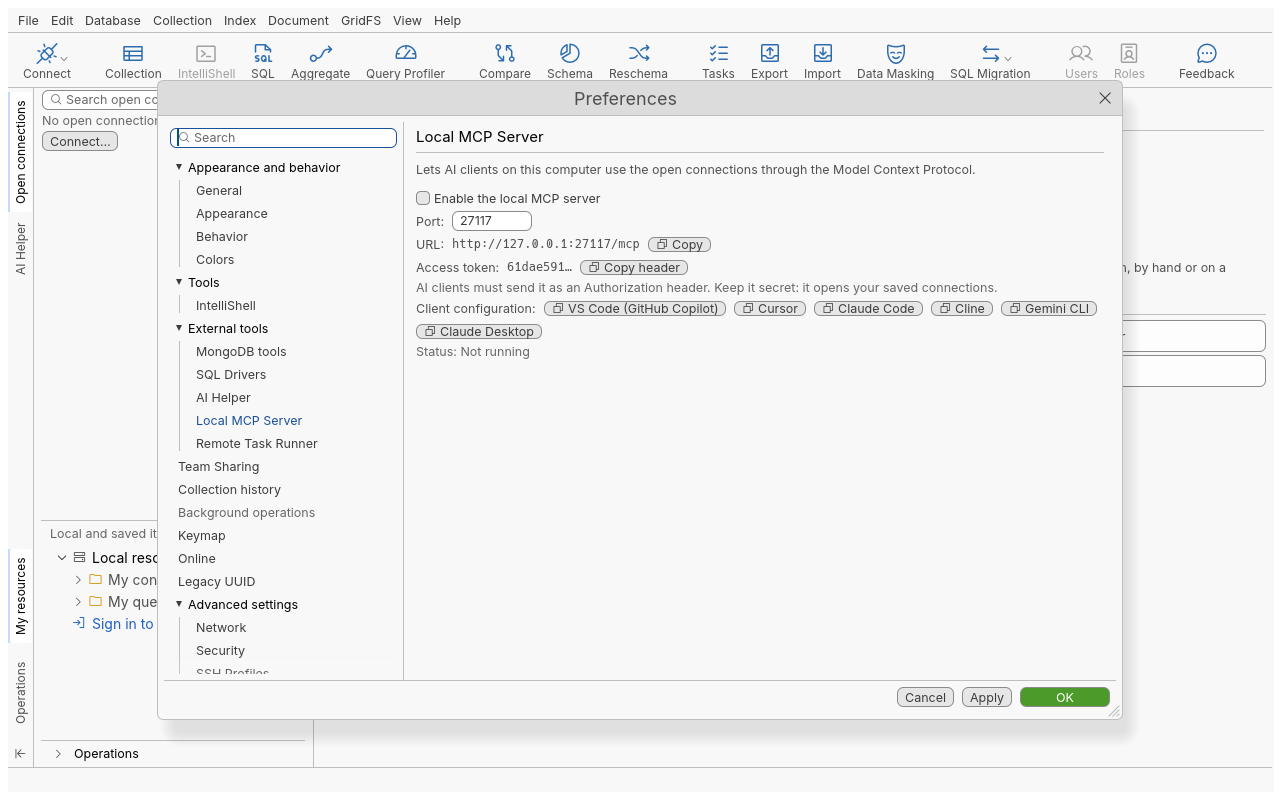
The server is off by default. It listens on 127.0.0.1 only, so only programs on this computer
can reach it, and every request must carry a secret access token.
Turn it on
- Open Edit › Preferences, then External tools › Local MCP Server.
- Tick Enable the local MCP server. Change the Port if 27117 is taken.
- Click Apply or OK. The page shows Status: Running and the URL, for example
http://127.0.0.1:27117/mcp.
Connect your AI client
The client needs two things: the URL, and the access token sent as an Authorization header.
- On the same page, next to Client configuration, click the button of your client. This copies
a ready-made configuration, URL and token included. Configurations are offered for VS Code
(GitHub Copilot), Cursor, Claude Code, Cline, Gemini CLI and Claude Desktop (through the
mcp-remotebridge, which needs Node.js). - Paste it into your client’s MCP configuration and restart or reload the client.
- For another client, use Copy next to the URL and Copy header next to Access token, and enter both by hand. The transport is Streamable HTTP.
A typical configuration looks like this (the token is yours, shown shortened here):
Choose which connections agents can use
Agents use the connections you have open in Oxys DB Studio. To let an agent work on
acme_store, open that connection in the application first; the agent’s connect tool refuses any
other saved connection.
With the headless server (oxysdb-cli mcp), nothing is open at start: name the connections agents
may open with --allow-connection <id or name>, once per connection. See
Command line.
A connection whose password is not saved cannot be opened by an agent: passwords never travel over MCP. Save the password, or connect in the application first.
Tools
| Tool | What it does |
|---|---|
list_connections | Lists saved connections: id, name, folder, whether connected and whether read-only. Never an address or credential |
connect | Opens a connection you have open or allowed |
list_databases | Lists the databases of a connection |
list_collections | Lists the collections and views of a database |
find_documents | Runs a read-only query (filter, projection, sort, skip, limit) |
analyze_schema | Samples a collection and reports its fields and types |
get_collection_stats | Document count, sizes and index sizes |
list_indexes | The indexes of a collection |
explain_query | Explains a query, with a summary: collection scan or indexes used, time, documents and keys examined, warnings |
assess_collection_health | Summarises a collection’s indexing and how consistent its documents’ shape is |
list_connected_tabs | The tabs you have open (connection, database, collection), so the agent can follow what you look at |
Reference
| Setting or limit | Value |
|---|---|
| Default port | 27117 |
| Interface | 127.0.0.1 (loopback) only |
| Authentication | Authorization: Bearer <token>; the token is made on first use and stored in the mcp-token file of your data folder, readable by you only |
find_documents | 20 documents by default, at most 100 and about 1 MB per call; strings longer than 1,000 characters are cut (marked truncated); 15 s time limit by default, at most 60 s |
analyze_schema | At most 10,000 documents sampled |
explain_query | 30 s time limit on the server |
| Never read | The local and config databases and system.* collections |
| Requests | At most 16 at once; bodies up to 1 MiB |
Tips
- Open only the connections you want the agent to see, and prefer a read-only connection or a replica for exploratory work.
- Ask the agent to use
explain_querybefore suggesting an index; it reports collection scans and in-memory sorts. - The tools never change data. When you ask an agent for a change, it can write the query, and you run it yourself.
Troubleshooting
| Symptom | What to do |
|---|---|
| Port 27117 is already in use by another program… | Choose another port in Preferences, then update the URL in your client. |
| The client gets 401 Unauthorized | The Authorization header is missing or the token is wrong. Copy the client configuration again. |
| The client gets 403 Forbidden | The client sent a Host or Origin other than 127.0.0.1, localhost or [::1]. Use the URL exactly as shown. |
| The client cannot connect at all | Check Status: Running in Preferences; the server stops when you untick it or close the application. |
| agents may only use connections open in Oxys DB Studio… | Open that connection in the application, or allow it with --allow-connection in headless mode. |
| This connection needs a password that is not saved… | Save the connection’s password, or connect in the application first. |
| … (agents may only run read-only commands) | The agent tried something that writes. This is by design. |